

The thirteen payment methods
Taberna supports thirteen coins across five networks. A network (or blockchain) is the public ledger a coin lives on; the same coin on two networks is two different payment methods, because the money travels on different rails.A stablecoin is a crypto token that tracks a normal currency one-to-one, so 1
USDC is always worth about $1. Native coins — SOL, ETH, POL, BNB — move in price
all day.
What to switch on first
Start with one stablecoin on a low-fee network — USDC on Base or on Polygon. Two reasons:- Your customer pays a few cents to send it, instead of several dollars on Ethereum.
- The amount does not drift while they are paying. With a native coin, the price is locked for the payment window and the customer bears any movement outside it; with a stablecoin there is nothing to move.
Turning methods on
Payment methods are set per store, under Settings → Payments. Each network gets its own panel with a switch per coin. When you first set up your store you choose one network and Taberna switches on every coin on it for you. After that you turn coins on and off individually.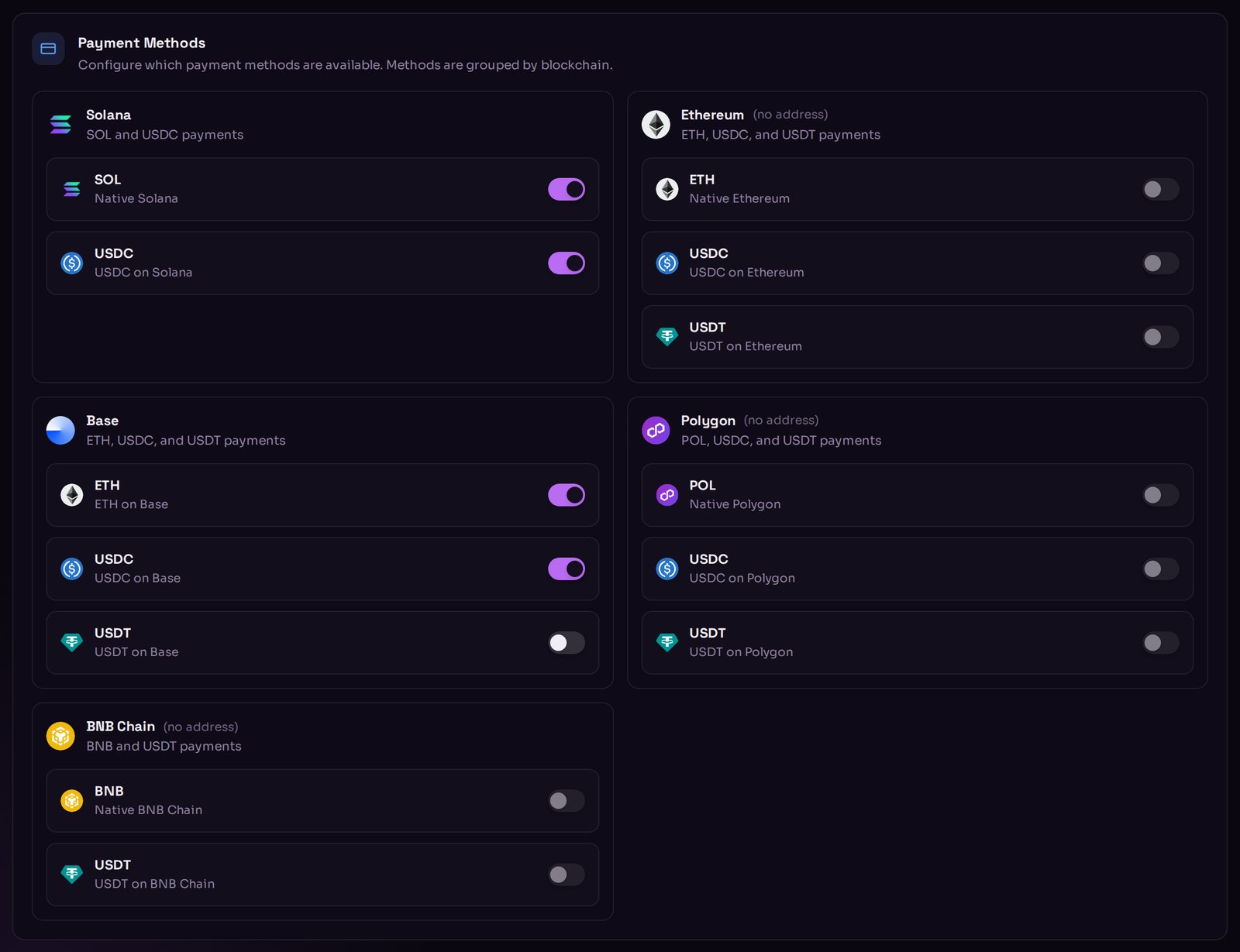
Settings → Payments: a switch for every coin, grouped by network.
Enabling a network’s coins is only half the job. You also need a payout address
on that network, or there is nowhere for the money to go. See
Payout wallets.
What to read next
Payout wallets
One receiving address per network.
Crypto basics
Wallets, stablecoins and network fees explained.