

One address per network
You register one address for each network, under Settings → Payments. There are five, so five is the most you can have:
Ethereum, Base, Polygon and BNB Chain all use the same address format, but you still set
each one separately — you may well want them going to different places.
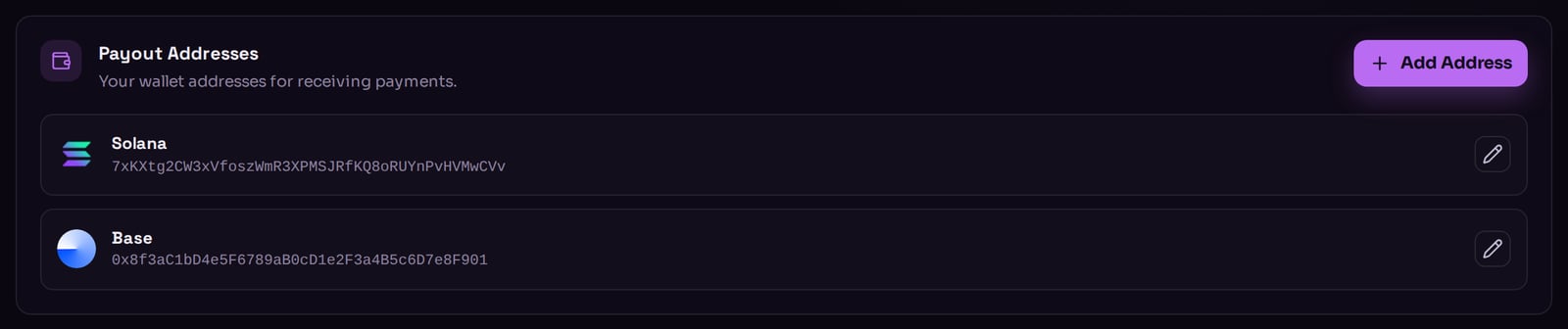
Settings → Payments: one payout address per network.
Adding one
Press Add Address, choose a network, paste the address, and save. Only networks that do not already have an address appear in the list. Taberna checks the address before saving it. A Solana address has to decode properly and be the right length; an address on the other four has to start with0x and be 40 hex
characters after that. The all-zero address is refused outright, because money sent there
is gone forever.
Paste the address; never retype it. Taberna can tell you the address is
well-formed, but nothing can tell you it is yours. Send yourself a small test
payment the first time if you want to be certain.
Changing one
Open the address and press the pencil icon. You can change the address, but not which network it belongs to. There is no confirmation step and no delay — the next sale on that network goes to the new address. Payments already on their way to the old address still land there. If you are changing an address because you lost access to the old wallet, check your recent orders first. Addresses cannot be deleted, only replaced. If you want to stop accepting a network, switch its coins off under Payment Methods instead.Why a coin will not switch on
Each network’s coins stay greyed out until that network has a payout address — the panel is labelled (no address) until you add one. Taberna will not let you accept money it has nowhere to send.What to read next
How you get paid
What happens between your customer paying and your wallet filling.
Payment methods
Which coins to accept.